Warning: Use of undefined constant REMOTE_ADDR - assumed 'REMOTE_ADDR' (this will throw an Error in a future version of PHP) in /home/ks4wdarnrs22/domains/tzplanet.com/html/words/wp-content/plugins/az-one/az-one.php on line 85
Warning: Use of undefined constant REMOTE_ADDR - assumed 'REMOTE_ADDR' (this will throw an Error in a future version of PHP) in /home/ks4wdarnrs22/domains/tzplanet.com/html/words/wp-content/plugins/az-one/az-one.php on line 85
Warning: Use of undefined constant REMOTE_ADDR - assumed 'REMOTE_ADDR' (this will throw an Error in a future version of PHP) in /home/ks4wdarnrs22/domains/tzplanet.com/html/words/wp-content/plugins/az-one/az-one.php on line 85
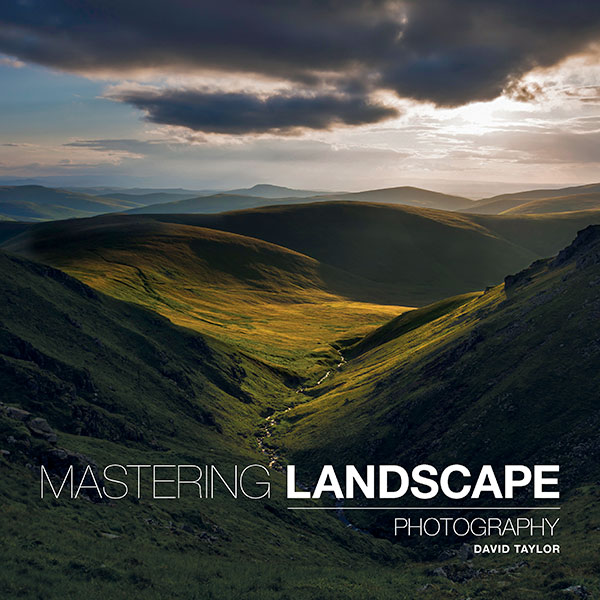
Book Cover: Mastering Landscape Photography – David Taylor
BOOK INFO
Title:Â Mastering Landscape Photography
Author:Â David Taylor
Publisher:Â Ammonite Press
Release date:Â July 2014
Edition:Â 176 pages, soft cover
ISBN:Â 978-1-78145-084-0
ABOUT DAVID TAYLOR
David Taylor is a landscape photographer based in Northumberland, England. I’ve been following David’s work for some time now, primarily because I live in the area where the majority of his work is shot, and have admired his landscape images since I’ve moved into the area.
Besides his photography works, which can be regularly seen exhibited, David was a contributor to over twenty photography books.
THE CONTENT
Mastering Landscape Photography is divided in eight chapters:
- Equipment
- Exposure
- Light
- Preparation
- Subjects
- Composition
- Filters
- Postproduction
MYÂ IMPRESSIONS
I was excited for having the chance to review this book – I had read a review somewhere else that really raised the expectations. However, my first glance at the book was not impressive - the cover is very dark and far from the digital cover image I had seen previously (and which you can see above). My best guess is the printers did a less-than-optimal job on this one, which is a shame. A book on landscape photography really needs that wow factor from an impressive cover. But a book should not be judge by its cover, or so they say…
Inside it’s completely different – the images are vibrant and bright, as one could expect for a photography book.
In terms of content, I was positively impressed. Yes, it mostly addresses the basics of photography, exposure, aperture, ISO, depth of field, hyperfocal distance, etc etc, but all with clear examples showing the effects in landscape photos. For example, far from the boring technical explanations of gear nowadays so commonly found as filler in photography books, the chapter on equipment is demonstrates the impact different choices of gear have in landscapes. For instance, the effect of lens compression on the landscape and the relationship foreground/background, depending on the choice of lens.
Other example of a nicely written and informative chapter is “Preparation”. The author goes into some detail on his process of how to prepare for a “landscape session” including scouting locations, choosing the right time of day or even season, etc. Also addressed are the typical challenges found with different types of landscape, from coastal scenes to dark woodland.
In his chapter on composition, I was glad to read little gems that are so often forgotten and very well explained in this book – for example the concept of “visual weight”, of uttermost importance in landscape photography, and some theory on color harmony and complementarity. Again, well illustrated with nice imagery.
Interestingly (and positive) is the fact that almost as many pages are dedicated to the use of filters in landscape photography as are dedicated to post-production – nicely done David.
“Landscape photography gives you permission to temporarily cut yourself off from the modern world. Being out in the landscape early in the morning or late in the evening means you’re often on your own, with only your thoughts for company. These are all good things: creativity requires a certain amount of peaceful contemplation to flourish.”
CONCLUSIONS
Let’s forget about the cover disappointment for a second. Is reading “Mastering Landscape Photography” going to make you a master in landscape photography? No. For that, read all the books you want, but only being in the field and spending hours behind the camera studying light and how light falls on the landscape, and years of shooting, will take you in that direction. Is this a bad book then? Also not. It is actually a very nicely written book, with a good mixture of content and imagery, enough depth, easy to read and, with a bit of pushing, could even be considered a good reference book. Is this a book for seasoned photographers? Probably not. However, for someone that is now starting in photography and in particular with an interest in landscape photography, I can definitely recommend “Mastering Landscape Photography” by David Taylor.
Please Note:Â This book was sent to me by the publisher for review. Financial compensation was not and will not be received and the review was not read or edited by the publisher before publication. The opinions expressed are mine alone.
]]>Warning: Use of undefined constant REMOTE_ADDR - assumed 'REMOTE_ADDR' (this will throw an Error in a future version of PHP) in /home/ks4wdarnrs22/domains/tzplanet.com/html/words/wp-content/plugins/az-one/az-one.php on line 85
Warning: Use of undefined constant REMOTE_ADDR - assumed 'REMOTE_ADDR' (this will throw an Error in a future version of PHP) in /home/ks4wdarnrs22/domains/tzplanet.com/html/words/wp-content/plugins/az-one/az-one.php on line 85
Warning: Use of undefined constant REMOTE_ADDR - assumed 'REMOTE_ADDR' (this will throw an Error in a future version of PHP) in /home/ks4wdarnrs22/domains/tzplanet.com/html/words/wp-content/plugins/az-one/az-one.php on line 85
Warning: Use of undefined constant REMOTE_ADDR - assumed 'REMOTE_ADDR' (this will throw an Error in a future version of PHP) in /home/ks4wdarnrs22/domains/tzplanet.com/html/words/wp-content/plugins/az-one/az-one.php on line 85
Warning: Use of undefined constant REMOTE_ADDR - assumed 'REMOTE_ADDR' (this will throw an Error in a future version of PHP) in /home/ks4wdarnrs22/domains/tzplanet.com/html/words/wp-content/plugins/az-one/az-one.php on line 85
Warning: Use of undefined constant REMOTE_ADDR - assumed 'REMOTE_ADDR' (this will throw an Error in a future version of PHP) in /home/ks4wdarnrs22/domains/tzplanet.com/html/words/wp-content/plugins/az-one/az-one.php on line 85
Warning: Use of undefined constant REMOTE_ADDR - assumed 'REMOTE_ADDR' (this will throw an Error in a future version of PHP) in /home/ks4wdarnrs22/domains/tzplanet.com/html/words/wp-content/plugins/az-one/az-one.php on line 85
Warning: Use of undefined constant REMOTE_ADDR - assumed 'REMOTE_ADDR' (this will throw an Error in a future version of PHP) in /home/ks4wdarnrs22/domains/tzplanet.com/html/words/wp-content/plugins/az-one/az-one.php on line 85
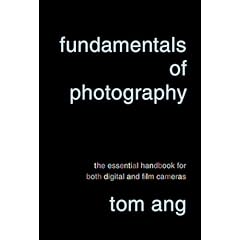
Book Info
Title: Fundamentals of Photography – the essential handbook for both digital and film cameras
Author: Tom Ang
Publisher: Alfred A. Knopf
Release date: November 2008
Edition: 352 pages, soft cover
ISBN: 978-0-375-71157-2
Just a small note before I start with the review: I have a couple of copies of this book to give away. Details are bellow, so keep on reading.
Tom Ang
Tom is an award-winning photographer with many books published in the photography world. He had several teaching positions and was a senior lecturer in Photographic Practice at the University of Westminster. His work was seen worldwide in several exhibitions. The last time I came across Tom’s name was at the jury panel for the Wildlife Photographer of the Year 2008 competition.
Besides Fundamentals of Photography, some other books by Tom Ang (a small sample since the full list is way too large) are: Digital Photography Masterclass, Tao of Photography, Advanced Digital Photography, Erotic Home Photography and How to Photograph Absolutely Everything.
The Content
Fundamentals of Photography is divided in 11 main chapters:
- What is Photography?
- Fundamentals of Light
- The Camera
- Capturing Light
- Using the Lens
- Manipulating Light
- Working with Color
- Processing the Image
- Digitizing the Image
- Outputting the Image
- References
My Impressions
 Photography has evolved immensely in the past decade. Digital photography became much more affordable and is now the norm with film relegated basically to the serious enthusiast. This tendency can also be seen in the dedicated photography books and if you take some time at your local book store and overview the contents of the books on photography edited in the last years chances are that a big majority is focused on digital photography. Unfortunately, and of course this is my personal opinion, by “digital photography†many editors are only thinking about digital darkroom. And while knowing what can be done with an image on the computer is a necessity and a pleasure to explore, photography is much more than that. Photography is understanding the camera and how light is captured, is understanding light and knowing how to modulate it, is understanding how an image will be perceived by someone looking at it,… And there is where this book excels.
The content is extremely well structured and explained in detail without overwhelming the reader. Although it can be read from cover to cover in one sitting, one of the strengths of the book is being structured in a way that individual chapters stand by themselves and can be referenced on their own. The sub-chapters are well divided and have just the right length: enough to provide all the information without crossing the “too boring†barrier. Every definition or concept is explained in great detail without sounding excessive, but it does go deep and it is not what can be considered light reading. Even if you are a seasoned photographer, I believe that within the book you’ll find some information that you haven’t seen before. In any case, this is not a “field guideâ€. Don’t expect to use it as a always-carry-in-your-camera-bag book.
With over 1000 illustrations and photographs complementing the definitions, the book is visually very appealing and able to provide information on just a quick overview. From example photos to schematics on lenses, cameras and other gear, you’ll find everything here.
Intermingled with the content there are small sections that target the more advanced user or the really curious photographer and are technically more complex. Again, bypassing these sections, will not detriment in any way the understanding of the remaining content, but is good to have them around. There is no such thing as too much knowledge…
On the photography gear side, details on available equipment abound. Moreover, Tom gives constant advice on which type of equipment is needed or better suited for a certain kind of shot. And besides that, you’ll get explanations on how the equipment works, allowing you to completely understand the functionality of the equipment and why it might be better suited for a certain task.
Pros and Cons
Pros:
- Price – at the current listed price, it can’t be beaten
- Huge amount of good information (read again: GOOD INFO & HUGE AMOUNT)
- Content well structured
- Suited for both beginners and seasoned photographers
- Tons of photos and illustrations
- Approaches both digital and film
Cons:
- Page layout can be tricky at times with so many boxes and side notes.
In Conclusion
As I mentioned before, if you are looking just for digital darkroom information, Fundamentals of Photography might not be the more adequate for you. This book feels like a photography encyclopedia and is a reference for everyone wanting to understanding it more. If there was only one book that I’d be able to recommend to anyone wanting to learn photography, this one could very well be it.
Free copy of Fundamentals of Photography
The publishers were kind enough to offer me a couple of copies to give away. One of the copies I’ll be giving here on my blog while the other is offered on PhotoNetCast (the photography podcast I’m co-hosting). This means, two chances for you to win. If you’re interested in a copy just write a comment saying you’re interested. You can leave your comment right on this post, on the show where the giveaway was announced, or both. BE QUICK. On Wednesday, Feb 4th, in the evening, I’ll be randomly selecting the winners. Your comment has to be in by then.
Please Note: This book was sent to me by the publisher for review. Financial compensation was not and will not be received and the review was not read or edited by the publisher before publication. The opinions expressed are mine alone.
Photo Credit: “Confused/Relaxedâ€, by stevec77 (CC)
]]>
“Where Were You When You Took That Picture?”
With this slogan, ATP Electronics introduces their line of geotagging devices.
Adding precise location tags to photos and being able to display them on a map has been a constant buzz since the technology was introduced, and I have to say that I wasn’t an instant fan.
But things change and technologies evolve, and now, after ATP’s much acclaimed Photofinder, a new generation in the series is ready to hit the market and revolutionize the way geotagging is done, the Photofinder Mini.
Geotagging, an overview
I’ve written before about geotagging, and we have also addressed it on PhotoNetCast. But what is geotagging after all? (is it possible that you’ve never heard about it?)
Geotagging is basically the inclusion of location tags (such as latitude, longitude and, sometimes, altitude) to the metadata of the image files. Using mapping software such has Google Earth & Google Maps, Panoramio, etc. the precise location where the photo was taken can be easily displayed and many photography applications, including Adobe Lightroom 2 and Picasa, are able to read the tag and display the photo on a map.
Usually the location is received from the satellites at certain time intervals (in the seconds range), and the time and coordinates are recorded on the receiver. The principle used to match the location with a certain photo is simply time synchronization: the location tags included in an image file are the ones whose recorded time point on the receiver most resemble the time the photo was taken. This synchronization is mostly done with the help of 3rd-party software able to read the GPS receiver log file and create the tags on the image files. And this is where Photofinder Mini excels – No 3rd-party software required.
Photofinder Mini
The Photofinder Mini brings a new twist to photo geotagging making this product extremely attractive for the general consumer market: No need for 3rd-party software – actually, no need for a computer at all.
In theory, this is how Photofinder Mini works:
- Turn on the receiver and carry it wherever you go on your photo tour;
- Plug the receiver and your card (supports CF, SD, MMC, MS) into the docking station;
- Adjust the time settings on the docking station to match your camera’s;
…and voilà . Everything done and your images are now geotagged and ready to be seen on a map.
Was it really that easy? Well, yes if you shoot JPGs and no if you shoot in RAW. But let me explain…
Hands-on approach
What’s in the box
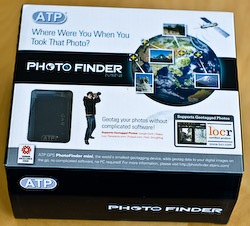 Â
 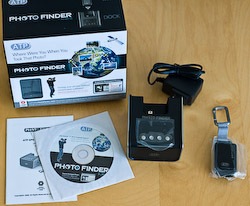
- User manual: It’s small and easy to read, but I got the feeling that some things, like adjusting the time settings on the dock, could be better explained. Not that it’s hard to do, but some not-so-tech-savvy people might require a little more explaining.
- User manual, on a CD: come on, is it really needed? I understand that country regulations require companies to include a paper manual, but if you already have the manual online (pdf) why the cd?
- Power supply
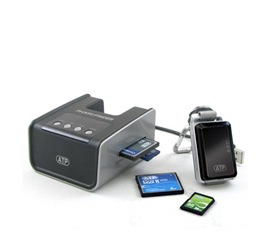
- Docking station: The real innovator. A display, pretty basic but there’s no need for a better one, four buttons, slots for cards and the dock for the GPS receiver, that’s all that is needed. And since you can connect it to a computer, you can use it as card reader.
- GPS receiver: At 40 grams and 6 cm (just over 2 inches) on the widest size, you can’t get anything less obtrusive. Comes with a clip to attach the receiver to whatever you want (pants, camera bag, etc). Besides that, it looks good. Insides, comes with a rechargeable battery providing juice for over 16 hours of operation and a 128Mb MMC card capable of holding about 550 hours of coordinates. If you want to skip the docking station (more on this bellow) you can connect the receiver directly to your computer, which also recharges the battery.
My experience with the Photofinder Mini
Acquiring data and positioning precision
After turning the receiver on, it took about 14 minutes to receive the ALMANAC data (satellite information). This is normal and should happen only once or if you travel over 500 Km. The following times it took about 30-40 seconds to start acquiring data.
I ran a few tests, inside or outside buildings and urban or rural areas, still without camera. After transferring the log file to Google Earth, I’ve noticed that the receiver is extremely precise on clear areas never missing a point. Around tall buildings it can skip a beat or two but the biggest error I got was about 50 meters, so not bad. Inside buildings it performs the worst, as expected.
Turning the camera on
Although the majority of consumer cameras, specially P&S, save images as JPEG, I like my images in RAW. This posed the first problem: as with the majority, if not all, of the geotagging devices on the market, and due to the proprietary formats of RAW files, only JPGs are supported by Photofinder Mini. This problem for RAW shooters can be overcome by three different approaches:
- Shoot in both RAW and low quality JPG (to minimize file size)
- Shoot in RAW only and use software for the synchronization
- Shoot RAW and tag your files after processing and exporting to JPG
The way I look at it, this is a disadvantage because you can’t use the simple workflow that the Photofinder Mini is so innovative for, but is also an advantage because I really don’t want any application touching my RAW files before they are safely stored and backed up.
I went out to photograph and opted by shooting in RAW and low quality JPG. With this approach I have my separate RAW files and a JPG file that the Photofinder Mini can use to insert location tags. On return, I backed up the card files and, as expected, after inserting the card on the slot and docking the receiver, tagging went flawlessly. All my JPGs were correctly tagged. Then it was a matter of synchronizing metadata from the JPGs to the RAW files in Lightroom.
Then I tried to find out what was possible to do if I only had RAW files. Using my backed up RAWs (without the location tags), I exported the log file from the GPS receiver directly to the computer and used a popular free software, GeoSetter, to insert the tags into xmp sidecar files. Upon importing into Lightroom (which reads the information from the sidecar file), all the files were perfectly tagged.
The third, and my least preferred approach, is to tag JPGs after processing the RAW files. After processing the RAW files in Lightroom, I exported the resulting JPGs into a card and inserted it into the docking station. The Photofinder Mini didn’t fail and was able to tag the files. The disadvantage of this method is that you have to copy the files again from the card to your storage location and re-import them into Lightroom and then synchronize the metadata with the RAW files. Also, I don’t always want all my RAW files as JPG or I might even processed them much later.
From any of these methods, the JPGs end up tagged and can be placed on a map. But again, if you shoot in JPG and don’t even know what a RAW file is, then geotagging your images with the Photofinder Mini is really just a one-step process: insert the card, and it’s done.
Pros & Cons of the Photofinder Mini
Pros:
- Innovative and easy to use: The idea of inserting location tags into image files without the need for 3rd-party software, or even a computer, is very attractive. I imagine this could be some kind of barrier for many people, and it’s now possible to answer that question “Where Were You When You Took That Picture?” without much hassle.
- Attractive: The GPS receiver that actually has to go with you looks good, it’s small and lightweight.
- Precise: I have tried only one other geotagger before (that shall remain unnamed) and the precision of the acquired location data was not even close to the one returned by the Photofinder Mini.
- Price: The recommended sale price for this unit will be US $149. Knowing that many other geotaggers out there sell for around this price or are more expensive and consist only of the GPS receiver, this price seems ok to me, not too cheap but not expensive.
- Battery: I’ll look at this both has an advantage and a disadvantage (see bellow). The unit uses a rechargeable battery good enough for 16 hours of continuous use and thus eliminates the need for carrying extra AAA batteries. Plug the unit to a computer or the docking station and it recharges the battery through USB. Simple.
- Card reader: The dock also works as a multi-format card reader (CF, SD, MMC, MS) and you can use it to transfer your files from a card into your storage place, even if you don’t want to geotag anything. Also, the GPS receiver has a MMS card slot (comes with a 128Mb MMS card for recording of log files) and this opens the possibility to update the firmware of both units easily.
Cons
- Battery: As I noted above, the GPS unit is powered by a rechargeable battery. A non-replaceable rechargeable battery… Although the 16 hours of use per battery charge sounds good, if I go on vacation for 2 weeks and decide not to carry a computer I’ll have to carry the dock to be able to recharge. Since the 128Mb MMS card is able to store up to 550 hours of data, I’d like the possibility of either having replaceable batteries, or a AAA battery slot that could be used after the main battery is down.
- No RAW support: As I also mentioned above, this is both an advantage and a disadvantage. In any case, after a nice conversation with a representative from ATP, I learned that RAW support is in the works, should come soon, and probably all it will be required is updating the firmware of the docking station.
- Confusing LED display: The GPS receiver tells you that it is on, is communicating with the satellite and recording data by flashing some little LEDs. What it is actually telling you is differentiated by a sort of light code (flash once every second, or twice every second, etc). This can be confusing and not so easy in bright sunlight. I know, I’m picky…
- No option to choose which images to tag: If it tags, it tags them all. It would be good to be able to select which images to tag on the dock unit. But then it would probably require a better display and the price would be higher. So, it’s a balance and a minor thing.
In conclusion
For someone who was not completely sure about geotagging, I’m now converted. As a reader mentioned on a comment before, geotagging might sound just another step on the workflow, but if for someone that travels around, photowalks and even for street photographers, with time, geotagging shows its true value.
The ATP Photofinder Mini is overall a good solution for both JPG shooters (for its easiness of use and functionality) and RAW shooters (for its precision). If you’re thinking about starting to geotag your images and none of the “cons” is off-putting to you, consider including the ATP Photofinder Mini on your to-buy options. It convinced me, and it convinced the editors of CHIP magazine (Germany) that awarded it the 2008 Best Accessory of the Year at Photokina.
UPDATE: A representative of ATP will be joining us on the next episode of PhotoNetCast to talk about the Photofinder Mini and the innovation it brings to the geotagging technology.
Please Note: A production unit of the ATP Photofinder Mini was sent to me by the manufacturer for review. Financial compensation was not and will not be received and the review was not read or edited by the manufacturer before publication. The opinions expressed are mine alone and reflect my own tests with the product.
]]>Warning: Use of undefined constant REMOTE_ADDR - assumed 'REMOTE_ADDR' (this will throw an Error in a future version of PHP) in /home/ks4wdarnrs22/domains/tzplanet.com/html/words/wp-content/plugins/az-one/az-one.php on line 85

“It’s not a photo until its a print”
With this quote Jim Goldstein introduced his Buying Prints from Your Favorite Photographers project. Basically, Jim’s purpose is to have photography fans acquiring and admiring the work of photographers not through a computer screen, but holding the final print. And let me tell you, the experience cannot be compared. After upgrading cameras and having bought some other equipment recently, this project could not have come at a worse time for me, financially speaking. So, I went for the next best thing after a fine art print and got a book from a photographer whose work I’ve been following for years: Sebastião Salgado.
Salgado is a Brazilian-born photographer (or photojournalist if you prefer) that started as an economist for the International Coffee Organization. During his time in Africa on assignment for the ICO, he started documenting his contact with the local populations, all the problems but also all the life inside those people. In “Africa”, Salgado goes back to his roots and compiles work from over 30 years in the continent. The book is 345 pages long, filled with more than 300 black and white photos and spiced up by some writings by the Mozambican author Mia Couto (at least in the edition I have).
Admiring Salgado’s work, specially in this book, is like being transported to a different world, one that in many aspects unfortunately still exists. The images of poverty and human misery, something that Salgado has been criticized in the past for glamorizing, are powerful enough to create a profound empathy between the observer and the subjects. If there is a way to photograph so many bad things and making something beautiful out of it, while at the same time not diminishing the suffering or value of the subjects, Salgado has definitely found it. In between, amazing African landscapes can also be admired… What a continent…
His photography style that translates into high-contrast black and white photos, highly enriched by grain texture, or his mastery in dodging and burning that so much enhance his work, is something that you can’t admire on a computer screen, and it’s one of the reasons I wanted to bring his work to Jim’s project. I’m finding myself spending incredible amounts of time looking at each of his images, being drawn to them, being mesmerized and going back for more.
I can’t frame and hang the book on my wall, but that’s for the better, for I would not know in which page to leave it open.
If you want a fantastic coffee-table book by a living Master, that is much more than just a collection of nice images and if you specially enjoy black and white photography, then Africa
Warning: Use of undefined constant REMOTE_ADDR - assumed 'REMOTE_ADDR' (this will throw an Error in a future version of PHP) in /home/ks4wdarnrs22/domains/tzplanet.com/html/words/wp-content/plugins/az-one/az-one.php on line 85
Warning: Use of undefined constant REMOTE_ADDR - assumed 'REMOTE_ADDR' (this will throw an Error in a future version of PHP) in /home/ks4wdarnrs22/domains/tzplanet.com/html/words/wp-content/plugins/az-one/az-one.php on line 85
Warning: Use of undefined constant REMOTE_ADDR - assumed 'REMOTE_ADDR' (this will throw an Error in a future version of PHP) in /home/ks4wdarnrs22/domains/tzplanet.com/html/words/wp-content/plugins/az-one/az-one.php on line 85
Warning: Use of undefined constant REMOTE_ADDR - assumed 'REMOTE_ADDR' (this will throw an Error in a future version of PHP) in /home/ks4wdarnrs22/domains/tzplanet.com/html/words/wp-content/plugins/az-one/az-one.php on line 85
Warning: Use of undefined constant REMOTE_ADDR - assumed 'REMOTE_ADDR' (this will throw an Error in a future version of PHP) in /home/ks4wdarnrs22/domains/tzplanet.com/html/words/wp-content/plugins/az-one/az-one.php on line 85
Warning: Use of undefined constant REMOTE_ADDR - assumed 'REMOTE_ADDR' (this will throw an Error in a future version of PHP) in /home/ks4wdarnrs22/domains/tzplanet.com/html/words/wp-content/plugins/az-one/az-one.php on line 85
Warning: Use of undefined constant REMOTE_ADDR - assumed 'REMOTE_ADDR' (this will throw an Error in a future version of PHP) in /home/ks4wdarnrs22/domains/tzplanet.com/html/words/wp-content/plugins/az-one/az-one.php on line 85
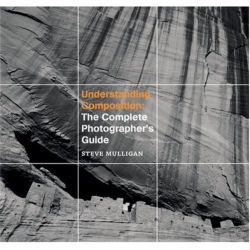

Mastering composition is one of the greatest challenges for many photographers and a skill that if understood and applied, can completely transform your photography. Unfortunately, it can also be one of the hardest.
In this article I’ll introduce to you a new book by Steve Mulligan: Understanding Composition: The Complete Photographer’s Guide.
Book info
Title: Understanding Composition: The Complete Photographer’s Guide
Author: Steve Mulligan
Publisher: Photographers’ Institute Press / The Guild of Master Craftsmen
Release date: September 2008
Edition: 176 pages in hard-cover
ISBN: 978-1-86108-534-4
Steve Mulligan
Steve is a Master Landscape Photographer (as selected by Outdoor photographer Magazine) from Utah, US. He is also an instructor at the Ansel Adams Workshops and specializes in landscape photography with emphasis on the untamed American landscape.
Besides Understanding Composition


The Content
Understanding Composition is divided in ten chapters:
- Introduction
- One: Equipment
- Two: Basics
- Three: Exposure and Focus
- Four: Color & Light
- Five: In Practice
- Six: On Computer
- Seven: The Final Image
- Glossary
- Index
My impressions
When I received the book my first thought was “How can you explain composition? This can’t be an easy one…”. Well, it seems that I was wrong. In fact Steve makes it quite easy and after I started reading I could not stop until the end. The book has an easy flow, from the basic technical explanations to all the techniques being applied further on.
With the advancement of the digital age and more powerful applications being developed, one trend in modern photography books is to show the reader not what can be done with the camera but only what can be done in the digital darkroom. In Understanding Composition it felt refreshing to break that trend and clearly shows the photographer’s background from film photography.
The main chapters address some photography basics, making sure that the reader understands what is going to be discussed further on. After the basic explanations (and after my “another basic photography book” thought evaporated) the real diamonds start to show. Every aspect of composition is explained in detail, from the pillars (Viewpoint, rule of thirds, etc.) to more advanced techniques like making use of light and shadows, color, framing or depth of field to lead the eye of the viewer through the photo. Steve also goes into detail on how the balance and direction of light, balancing color and even choosing angles to emphasize shapes can have a dramatic effect on photography.
And if I’m a profound supporter of admiring other photographer’s work to improve my own photography, making sure I understand what makes great a certain photograph, Steve makes this very easy in the book. The concepts are illustrated with “Compare shots” throughout the book, in which pairs of photos are placed side by side to emphasize how a certain feature (focus, differences in light, orientation, cropping, focal length, symmetry, etc) can impact and improve a photo. The selection of photos is excellent and I caught myself analyzing each image with the concepts explained before.
In the end, almost as an added bonus, the author dedicates a chapter to photography presentation, from books to exhibitions, with advice on which medium to choose, how to select and sequence photos for a gallery exhibition and even website presentation.
Pros and Cons
Pros:
- Easy reading with all the technical aspects clearly explained
- The layout is great, not overstuffed with text clearly giving breathing space to the images
- 176 pages filled with hundreds of photos
- High-quality edition comparable to many photography coffee-table books
- Not the cheapest book around, but for the quality it is extremely well-priced
Cons:
- Small author bio. I like to know more about an author when I read a book and two short sentences didn’t quite do it, but it’s a personal preference
- Although it’s a guide, some sub-chapters could be extended
In Conclusion
Understanding Composition: The Complete Photographer’s Guide
Please Note: This book was sent to me by the publisher for review. Financial compensation was not and will not be received and the review was not read or edited by the publisher before publication. The opinions expressed are mine alone.
]]>